token持久化
1.功能描述
- 集群内API网关的token,需要及时同步,用于client访问节点A进行认证,后续请求访问B。
- NJet 需要提供一个通用的会话同步机制,设置会话信息时,会话 id 是一个长字符串,会话信息需要能够设置有效期(TTL),过期的会话信息能够自动清除。查询时,输入参数是会话 id, 返回 addtional_data 。
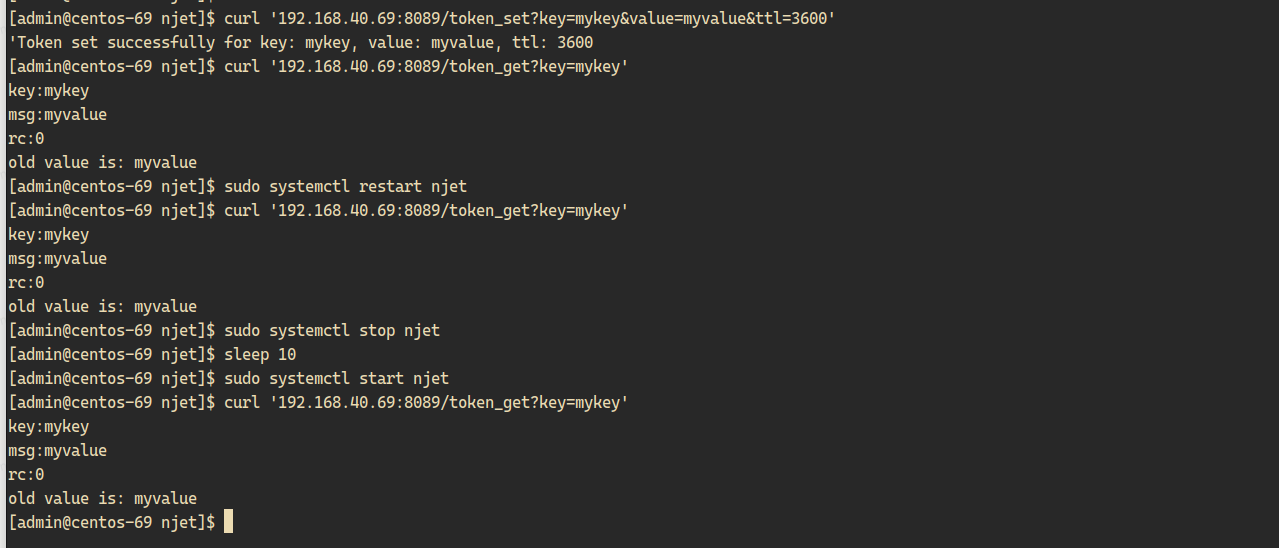
- token信息支持持久化,njet重启后会恢复(njet4.0以后版本支持)
2.依赖模块
load_module modules/njt_http_lua_module.so;
load_module modules/njt_http_token_sync_module.so;
3.指令说明
提供一个http模块: njt_http_token_sync_module 在http main部分提供 token_sync 指令
| Syntax: | token_sync zone={zonename}:{zonesize} sync_time={sync_time} clean_time={clean_time}; |
|---|---|
| Default: | - |
| Context: | http |
| 参数 | 取值 | 必填 | 说明 |
|---|---|---|---|
| zone | {name}:{size}比如token:4M | Y | 配置共享内存的名称和大小,用于存储token信息 |
| sync_time | 时间单位, 比如2s, 默认2s | N | token信息同步时间间隔 |
| clean_time | 时间单位, 比如5s, 默认5s | N | token过期清理时间间隔 |
4.配置样例
njet.conf:
load_module modules/njt_http_lua_module.so;
load_module modules/njt_http_token_sync_module.so;

http {
    dyn_kv_conf conf/iot-work.conf;
    include mime.types;
    access_log off;
    vhost_traffic_status_zone;
    access_log_write_zone  on;
    access_log_zone  log_zone 100m;
    #access_log_zone_ignore_ip  127.0.0.1;
    access_log_zone_valid  3;
    token_sync zone=token:4M sync_time=5s clean_time=10s;

    lua_package_path "$prefix/lualib/lib/?.lua;$prefix/modules/?.lua;$prefix/apps/?.lua;;";
    lua_package_cpath "$prefix/lualib/clib/?.so;;";
    server {
        listen       8089;
        location / {
           root html;
        }
       location /token_get {
          content_by_lua_block {
              local token_lib=require("njt.token")
              local args, err = njt.req.get_uri_args()
              local key = args["key"]
              njt.say("key:"..key)
              local rc,msg = token_lib.token_get(key)
              njt.say("msg:"..msg)
              njt.say("rc:"..rc)
              if rc == 0 then
                 njt.say("old value is: "..msg)
              else
                 njt.say("there is no such key in kv")
              end
          }
       }
location /token_set {
    content_by_lua_block {
        local token_lib = require("njt.token")
        local args, err = njt.req.get_uri_args()

        -- 获取 key, value 和 ttl 参数
        local key = args["key"]
        local value = args["value"]
        local ttl_str = args["ttl"]  -- ttl 以字符串形式传递

        -- 检查必要的参数是否存在
        if not key or key == "" then
            njt.say("Error: key is required.")
            return
        end

        if not value or value == "" then
            njt.say("Error: value is required.")
            return
        end

        if not ttl_str or ttl_str == "" then
            njt.say("Error: ttl is required.")
            return
        end

        -- 将 ttl 转换为整数
        local ttl = tonumber(ttl_str)
        if not ttl then
            njt.say("Error: ttl must be a number.")
            return
        end

        local rc = token_lib.token_set(key,value, ttl) -- 假设 token_set 接受的是 njt_str_t

        -- 根据返回值进行处理
        if rc == 0 then
            njt.say("Token set successfully for key: " .. key .. ", value: " .. value .. ", ttl: " .. ttl)
        else
            njt.say("Error setting token. Return code: " .. rc)
        end
    }
}


    }

}
组播集群配置
cluster_name njetxtcc;
node_name node-204;


stream {
        server {
                listen 230.9.231.254:5555 udp;
                gossip zone=test:1m heartbeat_timeout=100ms nodeclean_timeout=1s local_ip=192.168.40.204 sync_port=8873  ctrl_port=8081 bridge_port=45891;
        }
}
njet_ctrl.conf:
listen 0.0.0.0:8081;Token get 与token set的代码
       location /token_get {
          content_by_lua_block {
              local token_lib=require("njt.token")
              local args, err = njt.req.get_uri_args()
              local key = args["key"]
              njt.say("key:"..key)
              local rc,msg = token_lib.token_get(key)
              njt.say("msg:"..msg)
              njt.say("rc:"..rc)
              if rc == 0 then
                 njt.say("old value is: "..msg)
              else
                 njt.say("there is no such key in kv")
              end
          }
       }
location /token_set {
    content_by_lua_block {
        local token_lib = require("njt.token")
        local args, err = njt.req.get_uri_args()

        -- 获取 key, value 和 ttl 参数
        local key = args["key"]
        local value = args["value"]
        local ttl_str = args["ttl"]  -- ttl 以字符串形式传递

        -- 检查必要的参数是否存在
        if not key or key == "" then
            njt.say("Error: key is required.")
            return
        end

        if not value or value == "" then
            njt.say("Error: value is required.")
            return
        end

        if not ttl_str or ttl_str == "" then
            njt.say("Error: ttl is required.")
            return
        end

        -- 将 ttl 转换为整数
        local ttl = tonumber(ttl_str)
        if not ttl then
            njt.say("Error: ttl must be a number.")
            return
        end

        local rc = token_lib.token_set(key,value, ttl) -- 假设 token_set 接受的是 njt_str_t

        -- 根据返回值进行处理
        if rc == 0 then
            njt.say("Token set successfully for key: " .. key .. ", value: " .. value .. ", ttl: " .. ttl)
        else
            njt.say("Error setting token. Return code: " .. rc)
        end
    }
}
5.调用样例
5.1 设置token
curl '192.168.40.69:8089/token_set?key=mykey&value=myvalue&ttl=3600'5.2 查看token
curl '192.168.40.69:8089/token_get?key=mykey'5.3 重启Njet
sudo systemctl restart njet5.4 查看token
curl '192.168.40.69:8089/token_get?key=mykey'